


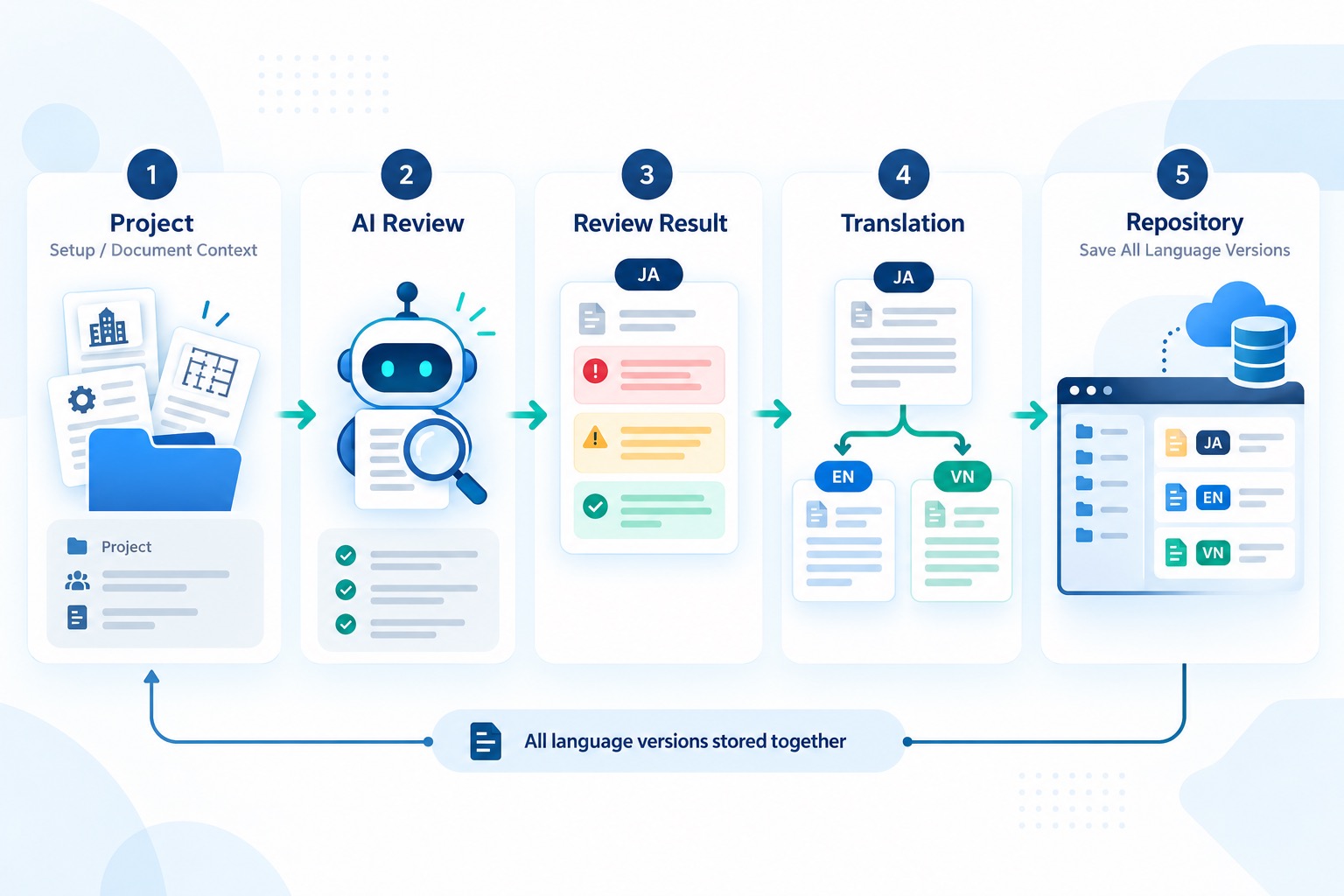


An AI model can review a design document and return useful findings. That alone does not make a review process reliable. In a project environment, an assessment must have the right document inputs, a visible execution state, an identifiable source project and an output that teams can locate later. When Japanese, English and Vietnamese users work together, translation introduces another layer of technical responsibility.
A practical implementation of AI-powered design document review support therefore connects several components: a project-oriented application, Python backend processing, asynchronous assessment execution, Microsoft Graph integration and SharePoint storage for the original and translated results.
The engineering challenge: making AI output usable
A disconnected AI response is difficult to manage when the reviewer cannot identify which project supplied the documents or where the result belongs. The implementation described here uses a project as the starting context, an assessment workflow for generating findings, and SharePoint as the destination for storing outputs. The central technical question is not just whether AI can return a review, but whether the complete sequence can be followed and retrieved consistently.
1. Start with project context and input validation
Before assessment starts, the user creates a project and associates it with the relevant SharePoint location. Keeping a project reference alongside the assessment avoids treating each review as an unrelated API request. This becomes especially important when the system handles multiple document sets or several concurrent reviews.
Some assessment types require particular design documents. Missing required inputs are a validation problem, not an AI processing failure. The workflow therefore needs to check document readiness before starting a review and return specific information about what is missing. This reduces ambiguity for users and helps separate input errors from execution errors.
2. Treat AI assessment as an asynchronous workflow
A document assessment may take longer than a typical browser request. In this implementation, the FastAPI backend validates the selected documents, creates an assessment task and returns a task ID without waiting for the AI review to finish. A custom asynchronous TaskManager processes queued tasks with controlled concurrency. Redis maintains task metadata, while database workflow records support execution history and status tracking. This design separates long-running assessment processing from the initial API request without requiring FastAPI BackgroundTasks or a separate external worker queue.
User-visible statuses such as queued, running, completed and failed help explain the progress of an assessment. These status transitions are recorded in the workflow history. After the AI generates the Japanese review report, the backend uploads the output files to the associated SharePoint location. The workflow is marked as completed only when the required processing and upload steps succeed. If the AI review finishes but the SharePoint upload fails, the error is propagated and the workflow is marked as failed rather than incorrectly reporting the entire operation as successful.
3. Integrate SharePoint through Microsoft Graph
Microsoft Graph provides APIs for discovering document library items and creating or updating file content in Microsoft 365. In this implementation, generated output files up to 4 MiB are uploaded using the PUT /content API, while larger files use createUploadSession with sequential 5 MiB chunks. The 4 MiB threshold is an application-level choice rather than the maximum supported by Microsoft Graph. For this type of integration, knowing that an API credential is valid is not sufficient. The application must also target the correct site or folder and have appropriate permission to read or write the intended files.
The workflow saves the Japanese review output to SharePoint after the AI assessment. When English or Vietnamese translations are generated, those outputs are also saved to SharePoint. This makes the Microsoft 365 workspace part of the review handoff rather than a separate manual export step.
4. Preserve meaning and traceability across JA, EN and VN
Japanese is the source language for the initial AI assessment. English and Vietnamese reports are generated by translating the original Japanese assessment rather than running separate AI reviews. This approach maintains a common source for findings, scores, review statuses and references to specific document sections across all three languages.
To maintain consistency, the implementation stores the original Japanese assessment in a structured intermediate JSON file. When an English or Vietnamese version is requested, the system translates the report text and overall assessment while retaining structured values, including the final score and finding severity counts. Standardized pass/fail wording is then applied using these values when generating the translated report. The translation instructions require filenames, numbers, dates, Markdown formatting and code blocks to remain unchanged. However, technical terminology and document references still require verification, as the current implementation does not enforce a fixed terminology glossary. The language-specific outputs are associated with the same assessment and saved to SharePoint.
5. Technical issues to examine in a real integration
- Project-to-folder mapping. A review must be linked to the intended document source and destination, not simply any accessible SharePoint location.
- Required-document validation. Incomplete input sets should be reported before unnecessary AI processing is started.
- Execution versus upload status. A successful AI response does not prove that the result was saved to SharePoint. The two stages need independent error handling.
- Multilingual consistency. Review findings, labels and document references must remain understandable across the original Japanese output and its EN/VN translations.
- Microsoft 365 permissions. Read and write access should be tested for the actual target folder, rather than inferred from token acquisition alone.
For reliable delivery, each of these conditions needs a clear validation or error boundary. Review execution, translation and file storage should be understandable as connected but distinct operations.
TTV’s technical capabilities illustrated by this work
This implementation highlights an engineering area where TTV can contribute: coordinating a web application, Python backend services, AI-driven document processing and Microsoft 365 APIs into a coherent workflow. The experience is relevant to organizations that want AI-assisted review without losing their existing SharePoint-based document collaboration process.
More generally, TTV can discuss application development, API integration and workflow automation approaches for enterprise document processes. The value lies in designing the connections between systems and presenting review outputs in a usable operational context—not in treating the model call as the entire solution.
Summary
- Start from project context so document inputs and output destinations remain meaningful.
- Validate required design documents before initiating the AI review.
- Track assessment execution separately from SharePoint storage.
- Generate the initial Japanese review and save it to SharePoint, then translate and save EN/VN versions.
- Preserve the relationship among the original review, translated outputs and project workspace.
If your organization is considering AI-supported document review or an integration with Microsoft 365, contact TTV to discuss the architecture and implementation approach: https://trans-tech.vn/contact-us/
Sources and technical references
Microsoft Graph – List the contents of a folder: https://learn.microsoft.com/en-us/graph/api/driveitem-list-children
Microsoft Graph – Upload or replace driveItem contents: https://learn.microsoft.com/en-us/graph/api/driveitem-put-content
FastAPI – Background Tasks: https://fastapi.tiangolo.com/tutorial/background-tasks/
TTV – Tech Stack articles: https://trans-tech.vn/tech-stack/