




How We Fixed Database Bloat from Millions of Emails: AWS SQS Buffering & Azure Blob Archival
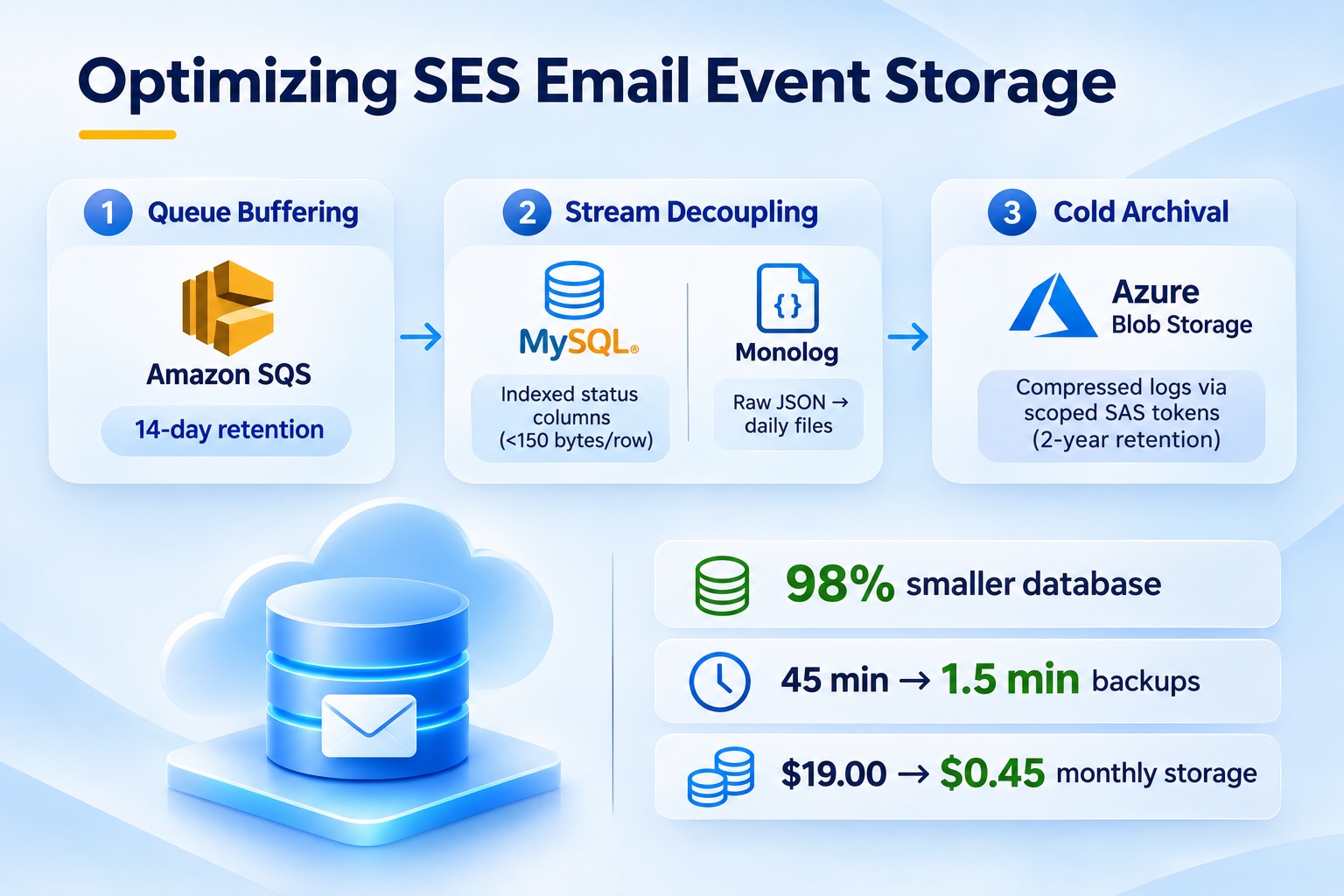
Our email logging table on Amazon RDS for MySQL grew past 22GB, slowing queries and dragging nightly backups out to 45 minutes. At the same time, compliance rules required keeping full audit logs for two years. Here is how we redesigned the pipeline: buffering status events with Amazon SQS, streaming detailed payloads to Monolog, and archiving compressed files to Azure Blob Storage.
- The Convenience Trap: Storing Everything in the Database
Our application runs on AWS, backed by an Amazon RDS for MySQL database in a Multi-AZ deployment (Tokyo region, ap-northeast-1). When building transactional email, the quickest approach was creating an `aws_mail_events` table. Each time an email sent or a callback fired, we wrote the recipient, status, and raw response payload directly into a `LONGTEXT` column. With a few hundred test emails a day during staging, this worked without issue.
Problems emerged once the portal handled production traffic: 600,000 emails per month for logins, verifications, notifications, and reports. Every dispatch produces multiple lifecycle callbacks: Send, Delivery, and occasionally Bounce or Complaint.
After six months of operation, three bottlenecks surfaced:
- Table bloat: The table reached 10 million rows and 22GB, consuming a major share of allocated storage.
- Slow backups: Our nightly logical backup script (mysqldump to S3) saturated disk I/O, taking over 45 minutes to scan millions of TEXT rows.
- Slow admin queries: Admin dashboard screens filtering by status slowed down because the InnoDB buffer pool spent memory caching large text chunks rather than index pages.
- Event Buffering: Why HTTP Endpoints Aren’t Enough
Amazon SES publishes delivery events through Amazon SNS. SNS supports pushing directly to an HTTPS webhook on your web server, and it includes a retry policy. However, per AWS documentation, total retry duration for an HTTP/S endpoint cannot exceed 3,600 seconds (1 hour) — this is a hard limit. If your application undergoes extended maintenance, a bad deployment, or database deadlocks exceeding 1 hour, incoming webhooks stop retrying and unhandled events are lost permanently.
Why not just attach a Dead Letter Queue to the SNS HTTP subscription directly? Because an SNS DLQ only captures messages after all retries fail; it provides no pull-based buffer to control consumption rates. You still face real-time push spikes during mass mailings, and must build custom replay mechanisms for failed requests.
We routed events through a queue instead: Amazon SES → Amazon SNS → Amazon SQS Queue.
Amazon SQS retains messages for 4 days by default, and we configured it to the maximum 14-day retention. A background worker pulls messages in batches of 10 using Long Polling (`WaitTimeSeconds: 20`), which minimizes empty poll calls. Because SQS acts as a pull buffer, the backend consumes events at its own pace. If the web tier undergoes maintenance, messages queue safely without risk of loss.
- Splitting Data: Database Metadata vs. File Logs
In practice, 99% of daily admin lookups only need basic fields: email address, timestamp, delivery status, and template ID. Staff rarely need the full 30-field JSON diagnostic payload from SES unless troubleshooting a specific reject. Storing large JSON strings in transactional tables was unnecessary.
We split the worker output into two paths:
- Database: Writes only `message_id`, `event_type`, `email`, `status`, and `created`. The `payload` text column was dropped. Row size fell below 150 bytes.
- Monolog: Writes full headers, diagnostic codes, and remote MTA responses to disk using `RotatingFileHandler` with `JsonFormatter`. Append operations are sequential and avoid database connection locks.
- Long-Term Storage: Why Azure Blob Storage?
Our application runs on AWS, so using Amazon S3 would have been the standard choice.We chose Azure Blob Storage because the enterprise required centralizing compliance logs and audit archives in Microsoft Azure. Active 30-day logs stored in the Azure Blob Cool tier are queried directly by enterprise audit dashboards and analytics services. Using Azure Blob SAS URLs let our application upload directly to the required container without complex cross-cloud IAM role setups.
Gzip compression reduces our daily JSON log files by roughly 75%. Monthly egress from AWS to Azure is under 2GB,costing roughly $0.23 per month ($0.114/GB from AWS ap-northeast-1).
Our storage tiering follows Azure Blob Lifecycle rules:
- Cool Tier (Day 1–30): Active 30-day logs accessible for routine compliance audits and reporting.
- Archive Tier (Day 31–730): Automated lifecycle rules transition logs older than 30 days to Archive ($0.00099/GB/month) for 2-year statutory compliance.Archive data is not queried for routine analytics or reporting; if a formal regulatory audit occurs, the operations team triggers on-demand rehydration (taking 1–15 hours).
Note minimum retention periods: Cool has a 30-day minimum, and Archive has a 180-day minimum (early deletion incurs fees). For compliance, we enable Time-Based Retention Policies (WORM) on the container to prevent accidental deletion.
A nightly cron job at 01:00 AM compresses the previous day’s Monolog file, uploads it to Azure Blob Storage, and verifies upload success before removing the local file. Once verified, another query purges database rows older than 30 days. The operational table now stays under 450MB.
- Results and Cost Comparison
Here is the impact on our environment after three months of running the updated pipeline:
|
Metric |
Before |
After |
|
DB Log Table Size |
22 GB (10M+ rows) |
450 MB (30-day window) |
|
Nightly DB Backup Time |
45 minutes |
1.5 minutes |
|
Monthly Storage & Egress |
~$19.00 (RDS Multi-AZ + Backup storage) |
~$0.45 (Azure Storage + Egress + SQS) |
|
Event Retention & Buffer |
Max 1 hour (SNS HTTP retry limit) |
Up to 14 days (Configured in SQS) |
Cost notes: Cost breakdown details:
|
Component |
Cost Breakdown (ap-northeast-1) |
|
Previous (~$19.00/mo) |
• RDS Multi-AZ gp3 storage: 22GB at $0.23/GB = $5.06 |
|
New (~$0.45/mo) |
• Azure Cool (30d) + Archive (700d) compressed storage: ~$0.15 |
|
Net Savings |
Reduced monthly storage and backup costs by ~98% (~$18.55/month). |
- Trade-offs and Architectural Risks
This design resolved our database storage and backup bottleneck, but introduced three trade-offs worth planning for:
- Local disk buffer window (25-hour RPO risk): Logs rotate on server disk until the 01:00 AM upload job, creating an un-uploaded window of up to 25 hours. Losing raw JSON traces in an instance crash was an explicitly accepted project risk, because business metadata is already saved in MySQL. For zero-data-loss compliance on raw payloads, schedule hourly syncs or mount persistent network volumes (EFS/EBS).
- SAS token security & rotation: SAS tokens act like bearer tokens. We restrict permissions to write-only (`w`), scope them to the target container, enforce short expiration windows, and rotate them automatically via AWS Secrets Manager.
- Asynchronous audit retrieval: While Cool tier logs are immediately queryable, retrieving logs older than 30 days from Archive requires planning ahead for rehydration delays.
- Operational Lessons
Operating this pipeline in production highlighted three practical implementation requirements:
- Enforce idempotency: Amazon SQS guarantees at-least-once delivery. We enforce idempotency by validating the composite unique key `(message_id, event_type)` before inserting database rows.
- Configure a Dead Letter Queue (DLQ): Malformed payloads or unexpected character sets occasionally fail JSON parsing. Always attach a Dead Letter Queue with `maxReceiveCount: 5` to isolate poison messages and prevent infinite worker crashes.
- Maintain instant suppression lists: When an event indicates a Permanent Hard Bounce (recipient mailbox does not exist), immediately register that address in your application suppression list. Preventing subsequent sends ensures your domain’s SES bounce rate stays comfortably below 2%.
Conclusion
Relational databases are designed for transactional queries, not append-only JSON log archives. Decoupling the two drastically reduced our database load, brought backup times from 45 minutes to 1.5 minutes, and kept our 2-year audit compliance intact. If your application tables are growing from event logs, consider moving raw payloads to cold object storage before query performance forces your hand.